
By Brittany McLendon, Senior Content Writer
At some point, every athletic director has gotten the call. Two teams. One gym. Same Tuesday night. And somewhere in the chain — a shared Google Calendar, an email nobody replied to, a whiteboard someone forgot to update — the booking fell through the cracks.
It’s not a people problem. It’s a process problem. And it’s exactly what facility scheduling software is built to prevent.
Facility scheduling software for schools is a centralized system that manages how campus spaces are requested, approved, scheduled, and tracked across athletics, activities, and community use. It brings structure to a process that is often spread across spreadsheets, shared calendars, and manual coordination.
In K–12 environments, managing facilities is rarely owned by a single role. Athletic directors, operations staff, administrators, and program leaders all play a part in coordinating how spaces are used throughout the day, after school, and on weekends.
As more groups rely on the same facilities, scheduling becomes harder to manage without a consistent system — and the cost of getting it wrong goes up every season.
Who Uses Facility Scheduling Software in K–12 Schools?
Here’s the coordination challenge most schools face: facility scheduling touches multiple roles across a school or district — and none of them fully owns the process. That’s not a design flaw. It’s the nature of a school campus. But it’s also why scheduling breaks down when there’s no shared system to anchor it.
Athletic Directors manage practices, games, and shared athletic spaces. They’re often the de facto owners of facility scheduling, even when that’s not formally their job.
School Administrators coordinate events, testing, and internal programs — often booking the same spaces ADs depend on, sometimes without realizing there’s a conflict.
Facilities and Operations Teams oversee building usage, setup, and maintenance. They need to know what’s happening in the building before it happens — not the morning of.
District Leaders manage scheduling across multiple campuses and need visibility into how facilities are being used across the district, not just at one school.
Coaches and Staff request and use facilities regularly — often informally, which is exactly where the gaps appear.
Community Organizations request access to school spaces for external use. Managing these requests alongside internal scheduling is where manual processes tend to collapse first. When any one of these groups is working from a different calendar, a different spreadsheet, or a different assumption about what’s available — conflicts happen. Not because anyone made a mistake, but because the process wasn’t built to handle this many moving parts.
Managing scheduling across multiple campuses adds another layer — different staff, different approval chains, different facility inventories, all needing to work from one shared system. That’s a district-level problem with a district-level solution, and it’s worth understanding before you evaluate any platform.
Why Do Schools Need Facility Scheduling Software?
Most schools don’t struggle because of effort — they struggle because the process is fragmented. Facility scheduling often spans multiple systems, teams, and workflows, making it difficult to maintain accuracy, visibility, and control. Here’s where it breaks down most often.
1. Multiple Calendars, No Single Source of Truth
Facility schedules are often spread across athletics calendars, shared Google Calendars, an email nobody replied to, spreadsheets, and individual inboxes. When a coach needs to know if the gym is available Thursday evening, they may check three places and still not be certain. The result: staff are forced to manually cross-reference multiple sources, and conflicts don’t get caught until someone shows up and finds the space already in use.
2. Conflicts Discovered Too Late
When facilities are shared across teams and programs, double-bookings are often discovered at the worst possible moment — when coaches, athletes, or community groups are already arriving – one of the most common issues schools face when relying on manual systems. Resolving them requires back-and-forth communication between staff that should have been unnecessary. One conflict is an inconvenience. Recurring conflicts are a credibility problem
3. Growing Demand for Community Facility Use
Many schools make facilities available to youth leagues, camps, and local organizations. As that demand grows, managing it manually adds real complexity — tracking availability, collecting insurance documentation, coordinating with internal schedules, and making sure external groups aren’t bumping up against athletic events. Without a system, this work falls to whoever is available, inconsistently.
4. Event Setup That Falls Through the Cracks
Scheduling a facility is only part of the process. Events also require coordination with custodial staff, equipment setup, and facility preparation. When that information isn’t captured alongside the booking — or communicated to the right people — it leads to last-minute scrambles that are entirely avoidable. The booking was approved. Nobody told the custodial team.
5. Reporting That Requires Starting From Scratch
When scheduling is managed across multiple tools, answering basic questions becomes surprisingly hard: Who used a space? How often was it used? Were fees collected for after-hours community use? Did the school recover costs? Without clear records, every reporting request requires manual reconstruction from emails, calendars, and memory — and the answer is never as reliable as it should be.
These challenges don’t come from one decision. They’re the predictable result of asking a process designed for simpler times to handle the complexity of a modern K–12 athletic department. As scheduling demand increases across athletics, academics, and community use, the spreadsheets and shared calendars that once worked stop being adequate.
If these challenges are already happening in your district, it’s worth understanding why schools move to a facility booking system—and what changes when they do.

How Does Facility Scheduling Software Actually Work?
Facility scheduling software replaces disconnected steps with a structured workflow. Here’s what that looks like in practice — and where it makes the biggest difference compared to a manual process.
In practice, facility scheduling software:
- Captures requests in one place
- Checks availability automatically
- Routes approvals
- Tracks event details and reporting
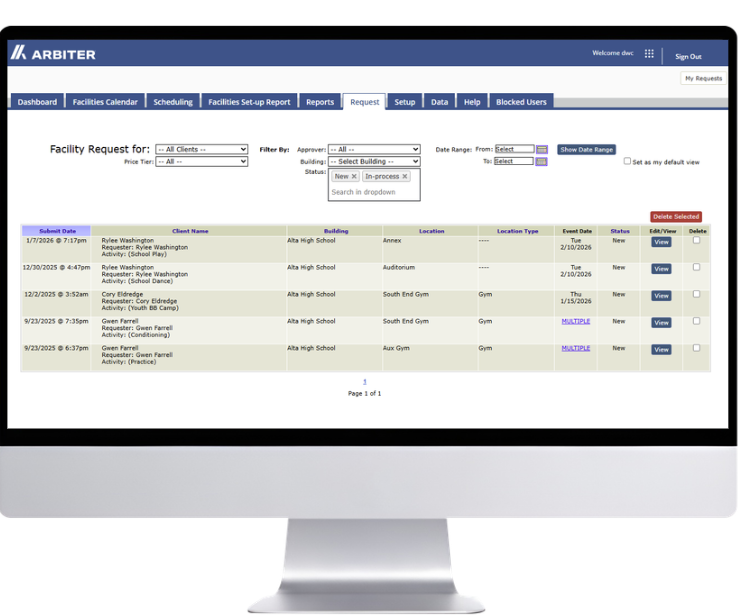
Step 1: A Facility Request Is Submitted
Instead of an email or a text to the AD’s office, requests are submitted through a consistent process that captures key details upfront: location, date, time, event type, setup needs.
Everyone uses the same form. No requests fall through the cracks because they came in through an informal channel.
Step 2: Availability Is Checked Automatically
Once submitted, the request is checked against existing bookings in real time including scheduled games and practices. If a facility is already reserved, the conflict is flagged immediately — before it becomes a problem.
No one needs to manually cross-reference a separate calendar.
Step 3: The Request Moves Through an Approval Workflow
Requests are routed to the appropriate approver based on the facility, event type, or organization. Depending on the school or district, this may involve one or more steps.
This is where most manual processes break down — the approval happens verbally or by email, but the details don’t get formally recorded, and the next person in the chain doesn’t know the booking exists.
Step 4: Event Details and Setup Needs Are Captured
Once approved, the booking isn’t just a calendar entry — it includes the operational details that make the event actually happen: setup requirements, equipment needs, custodial coordination. Capturing this upfront eliminates the last-minute scramble that results from scheduling the space but not the support it needs.
Step 5: The Event Appears on a Centralized Calendar
Once approved, the event is reflected in a shared calendar visible to all relevant staff. Coaches see it. The AD sees it. Operations sees it. There’s one version of the schedule, and everyone is working from it.
Step 6: Records Are Maintained for Reporting and Accountability
As events are scheduled and completed, the system maintains a full record of facility usage — who booked what, when it was approved, what the event required, and whether any fees were collected.
Reporting becomes a pull, not a reconstruction. The shift from manual coordination to a structured process isn’t just about saving time. It’s about building a system where accountability is built in — where the record exists because the process created it, not because someone remembered to write it down.
How Is K–12 Facility Scheduling Software Different From General Facility Management Tools?
This is worth addressing directly because some schools evaluate enterprise facility management platforms — tools designed for corporate campuses, hospital systems, or large real estate portfolios — and assume they’ll work for a K–12 athletic department.
They typically don’t fit well. Here’s why.
Facility management systems are built to support district operations like maintenance, work orders, asset tracking, and building automation — HVAC control, lighting systems, and long-term facility planning. Scheduling is often a secondary feature, not the primary one.
Facility scheduling software for K–12 schools is designed to manage how spaces are used on a day-to-day basis: coordinating practices, games, school events, activities, and community use across shared spaces like gyms, fields, auditoriums, and meeting rooms.
It’s built for the specific rhythm of a school athletic calendar — and for the people who manage it: ADs, administrators, and operations staff who aren’t IT professionals.
Key Differences at a Glance
| Facility Scheduling Software | Facility Management Software |
| Manages events, practices, and activities | Manages maintenance, assets, and building systems |
| Focuses on who is using spaces and when | Focuses on how buildings operate and are maintained |
| Used by athletic directors, administrators, and staff | Used by facilities and maintenance departments |
| Supports athletics, activities, academics, and community use | Supports infrastructure, automation, and long-term planning |
| Provides visibility into facility usage and scheduling | Provides visibility into building performance and maintenance |
Where These Systems Can Overlap
Some districts evaluate both types of systems because they solve different parts of facility operations.
A facility management platform may handle HVAC, work orders, and maintenance tracking — while a dedicated scheduling system manages who is using spaces, when, and how events are supported operationally.
In many cases, districts use separate systems for each or look for integrated platforms that connect both. Understanding which problem you’re trying to solve first makes the evaluation significantly clearer.
What Should You Look for in Facility Scheduling Software for Schools?
Most schools aren’t replacing a sophisticated system — they’re replacing a process that outgrew what it was built for. The goal isn’t a feature checklist. It’s a system that coaches, administrators, and community groups actually use consistently enough to become the single source of truth.
That said, here are the capabilities that matter most for K–12 athletic departments — and a note about which ones you need on day one.
A Centralized and Reliable Facility Calendar
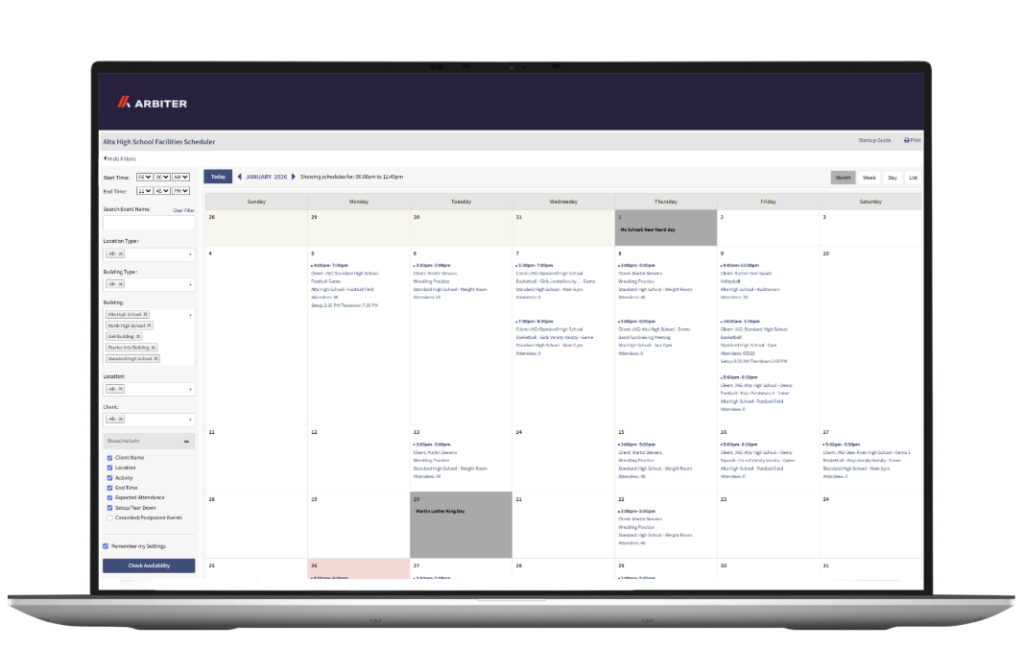
All facility bookings in one place. Not one calendar for athletics, another for activities, another for community use — one view that everyone can access and trust.
This is the baseline. Without it, nothing else the system offers matters.
Conflict Prevention That Works Automatically
The system should flag or block double-bookings before they happen — not after. Manual conflict checking defeats the purpose. Shared spaces like gyms, weight rooms, and multipurpose fields need this most. They’re where scheduling pressure is highest and conflicts are most disruptive.
Configurable Approval Workflows
Different schools have different approval chains. Some route everything through the AD. Others involve building administrators, department heads, or district offices depending on the event type. The system should let you define the workflow that matches your reality — not force you into a rigid structure that requires workarounds.
Support for Community Use and External Rentals
If your school rents facilities to community groups — and most do — this needs to happen within the same system, not as a parallel process. That includes handling requests, tracking approvals, maintaining documentation like insurance certificates, and keeping external bookings visible alongside internal ones.
Reporting That Doesn’t Require a Spreadsheet
Usage data should be accessible without manual reformatting. Which facilities were used, by which groups, during which periods — that information needs to be available in a format a principal or district administrator can actually use, not something that requires an hour of reconstruction before every budget conversation.
Integration With Your Existing Athletic Management Tools
Facility scheduling that connects to your game scheduling, payment processing, and registration systems removes the coordination overhead of managing separate platforms – especially when everything operates within a connected K-12 system.
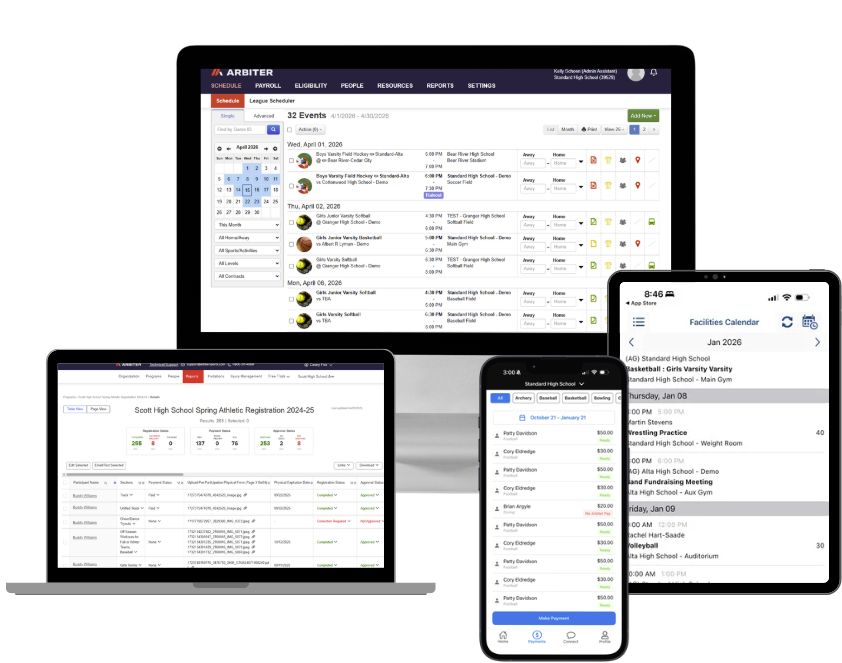
This is where a full athletic management platform has a clear advantage over a point solution — facility scheduling becomes one connected part of a complete system, not another standalone tool with its own login and data silo.
Scalability Across Multiple Campuses
If you’re managing more than one school, or anticipate growth, the system should handle multiple facilities and locations without requiring parallel setups. District administrators need visibility across campuses — not separate systems for each school.
Not every school needs all of these capabilities on day one. A single school with straightforward athletic scheduling has different requirements than a multi-campus district managing community rentals, cost recovery, and district-wide reporting. Start with what’s actually breaking in your current process — the system should solve that first, and grow from there.
Point Solution or Full Platform — What’s the Difference?
Facility scheduling software exists on a spectrum. At one end are standalone booking tools that handle one part of the process well — and stop there. At the other end are full athletic management platforms where facility scheduling connects directly to game scheduling, payment processing, and student registration. A booking in one part of the system is visible across all of it.
Neither approach is wrong — but understanding where a tool sits on that spectrum before you evaluate it saves time. A point solution may be the right starting place for a smaller school with a straightforward need. A platform becomes the better fit when you’re managing multiple systems across multiple stakeholders — and don’t want another disconnected tool to maintain.
Is Facility Scheduling Software Worth It for a Smaller School?
This is the objection most small-school ADs have when they first look at scheduling software — and it’s a fair one.
If you’re managing one campus with a handful of sports and limited community use, a purpose-built system can feel like more infrastructure than the problem warrants. The answer: it depends on where the friction is.
If your current process is causing recurring conflicts, costing you hours of manual coordination each week, or leaving you without an audit trail when something goes wrong — the problem is real regardless of school size.
Scheduling software built for K–12 is designed to be managed by one person, not an IT department. The implementation lift is significantly lighter than most ADs expect.
If your process is genuinely working — few conflicts, clear communication, and everyone working from the same calendar — the timing may not be right yet.
The schools that get the most from a scheduling system are the ones that have already outgrown their current process.
How Long Does It Take to Implement Facility Scheduling Software?
Implementation timeline is one of the first questions schools ask — and one of the most common reasons they delay a decision.
The concern is understandable: changing a scheduling process mid-season is disruptive, and most ADs don’t have bandwidth for a months-long rollout.
The good news is that K–12 facility scheduling software is not enterprise software. Most schools are live within a few weeks, not months.
Implementation typically involves:
- Setting up your facility calendar
- Configuring approval workflows
- Migrating existing bookings
Not a custom development project or IT overhaul. The schools that get live fastest start during a natural break in their athletic calendar — end of season, summer, or between semesters.
When Do Schools Typically Adopt Facility Scheduling Software?
Schools rarely adopt a scheduling system because everything is going well. They adopt it because something broke — or because they can see it’s about to.
The triggers are consistent across schools of different sizes and structures:
- Recurring scheduling conflicts despite best efforts
- Increasing demand from sports, activities, or community use
- New reporting or cost recovery requirements
- Coordination challenges across departments
- Lack of visibility into after-hours facility use
The pattern is almost always the same: the process worked until demand outpaced it.
At that point, the cost of maintaining it — in time, conflicts, and accountability gaps — is higher than the cost of changing it.
How Does Facility Scheduling Software Help Schools?
At its core, facility scheduling is not just about managing calendars — it’s about coordinating how people, spaces, and activities work together across a school or district.
A centralized scheduling system doesn’t eliminate complexity. It makes complexity manageable.
The direct benefits are well-documented: fewer conflicts, faster approvals, cleaner reporting, and a defensible audit trail.
The indirect benefit — hours returned to ADs and administrators each week — is harder to quantify but often more meaningful.
Schools that implement a structured scheduling system consistently report the same thing. The first season feels different. Not because everything is automated — but because the process is predictable. Everyone knows where to look. Conflicts are caught early. And the AD’s phone stops ringing at 6:30 PM.
Not sure where your current process is breaking down?
Take the 5-minute Facility Scheduling Health Check — 10 questions that show where your process is creating risk, extra work, or gaps. No email required.
FAQs
What is Facilities Scheduler?
Facilities Scheduler is Arbiter’s K-12 facility scheduling software designed to manage and track all bookings across buildings and locations. Administrators can approve requests, set workflows, assign work orders, and view all activity in real-time.
Who is Facilities Scheduler for?
Facilities Scheduler is a facility management system built for schools, districts, parks and recreation departments, and community centers that need a single platform to coordinate both internal use and public rentals.
Can Facilities Scheduler display both athletic and non-athletic events?
Yes. Facilities Scheduler manages athletic and non-athletic events—such as games, practices, assemblies, and community rentals—in one calendar for complete visibility. See how unified scheduling improves communication.
About the Author
Brittany taught high school English for six years. She’s passionate about helping schools simplify operations so both staff and students can thrive.