
By Brittany McLendon, Senior Content Writer
A Complete Guide for K–12 Athletic Directors
Athletic management software is a centralized platform that helps K–12 schools manage scheduling, athlete registration, eligibility, official assignment, payments, facilities, communication, and reporting within one connected system.
A game time changes, but transportation doesn’t see the update. A student becomes ineligible, but a coach is still working from an old roster. Parents receive one message while the athletics website shows another.
The problem usually isn’t effort. It’s that the process was never built to operate from a single source of truth.
That’s the role athletic management software is designed to fill.
Before platforms like these existed, athletic departments managed operations across spreadsheets, paper packets, email chains, phone calls, and disconnected software tools. The result was duplicated work, inconsistent information, compliance gaps, and hours spent coordinating logistics instead of supporting athletes and programs.
This guide explains:
- What athletic management software does
- Who uses it
- How it works
- How it differs from adjacent tools
- And what schools should look for when evaluating platforms
Who Uses Athletic Management Software?
Athletic management software supports multiple stakeholders across a school or district.
Athletic Directors
Athletic directors are typically the primary users. They oversee scheduling, official assignment, eligibility, facilities, communication, payments, and operational reporting across programs.
Coaches
Coaches access schedules, facility reservations, roster visibility, and communication tools while coordinating directly with athletes and families.
District Athletic Coordinators
District leaders use athletic management software to maintain visibility across schools, monitor compliance status, review financial reporting, and create operational consistency district-wide.
School Administrators
Principals and administrators often access reporting, eligibility information, and operational records for oversight purposes.
Parents and Athletes
Families use athlete-facing portals for registration, document submission, schedule visibility, payments, and participation communication.
Officials and Referees
Officials receive assignments, confirm availability, and manage payment records through the platform instead of relying on manual communication workflows.
What Problem Does Athletic Management Software Solve?
Running a school athletic department is one of the most operationally complex jobs in a school building.
The average athletic director coordinates:
- Multiple sports and seasons
- Coaches and athletes
- Shared facilities
- Game schedules
- Official assignments
- Eligibility requirements
- Payments and reporting
- Parent communication
- District and state compliance expectations
Most schools don’t start with athletic management software. They build processes over time:
- One tool for scheduling
- Another for registration
- Spreadsheets for eligibility
- Email for communication
- Separate systems for payments and reporting
Eventually, the operational gaps between those systems become difficult to manage.
Multiple Systems Create Conflicting Information
A game schedule changes, but the website still shows the original start time. Coaches text parents manually while facilities staff work from a separate calendar.
The issue usually isn’t that information doesn’t exist. It’s that different departments are working from different versions of it.
Schedule Changes Create Ripple Effects
Athletic schedules rarely stay static.
Games move. Facilities change. Weather creates postponements. Officials need reassignment. Transportation schedules shift. Parents and opposing schools need updates.
Each of those problems is manageable individually. The deeper problem is that they’re connected.
When systems don’t communicate, every change creates manual work across multiple people and departments.
Eligibility and Compliance Become Harder to Track
Eligibility often involves:
- Physicals
- Waivers
- Insurance forms
- Academic requirements
- Participation approvals
- District or state documentation
Without centralized visibility, staff spend significant time manually checking participation requirements across spreadsheets, emails, and paper records.
Reporting Requires Reconstruction
Many athletic departments still answer operational questions by manually combining information from:
- Registration exports
- Payment records
- Schedules
- Eligibility documents
- Facility calendars
That slows reporting and makes long-term visibility harder to maintain.
Athletic management software solves the coordination problem — not just the scheduling problem.
Quickly identify where disconnected systems are creating extra work, communication gaps, and operational risk.

What Are the Benefits of Athletic Management Software for Schools?
Athletic management software helps schools create more consistent, coordinated athletic operations across teams, campuses, and departments.
Better Visibility Across Athletic Operations
Athletic directors, coaches, administrators, and district staff all rely on the same operational information. Centralized systems improve visibility across schedules, eligibility, facilities, officials, payments, and reporting.
Less Manual Coordination
Disconnected systems create manual work every time schedules, eligibility status, or operational details change. Connected workflows reduce the amount of time staff spend reconciling information across platforms.
More Consistent Communication
When schedules, cancellations, or participation updates change, centralized systems help schools communicate more consistently across coaches, parents, officials, and administrators.
Stronger Accountability and Reporting
Athletic departments maintain records for participation, payments, approvals, scheduling updates, and operational history throughout the year. That improves long-term reporting and reduces reliance on manual reconstruction.
More Scalable Operations
As programs grow, operational complexity increases. Athletic management software helps schools maintain consistency across teams, campuses, seasons, and stakeholders without adding disconnected processes.
What Does Athletic Management Software Actually Do?
Athletic management software typically combines several operational workflows into one system. Platforms vary in how many of these areas they support, but most include some combination of the following capabilities.
Athletic Scheduling and Game Management
Athletic directors use scheduling tools to build and manage game schedules across sports, teams, and facilities.
Scheduling often connects directly to:
- facility availability
- official assignment
- parent communication
- public calendars and websites
When a game changes, connected systems can update dependent workflows automatically instead of requiring staff to manually update multiple platforms.
Official Assignment and Payment
Assigning officials is one of the most time-intensive operational responsibilities in school athletics.
Athletic management software helps schools:
- Assign officials to games
- Track confirmations
- Manage availability
- Process payments
- Maintain payment records
For districts managing large numbers of contests, centralized assignment and payment workflows reduce administrative overhead significantly.
Athlete Registration and Eligibility Management
Digital registration replaces paper packets and manual tracking.
Parents and athletes complete forms, upload required documents, submit electronic signatures, and pay participation fees through a centralized portal.
Eligibility workflows can then connect registration data to participation requirements and academic status, giving coaches and administrators better visibility into who is cleared to participate.
Facility Scheduling and Coordination
Schools often share gyms, fields, weight rooms, and auditoriums across athletics, PE, school events, and community use.
Athletic management software helps departments coordinate facility reservations, reduce conflicts, and maintain visibility across buildings and programs.
Athletic Payments and Financial Tracking
Athletic departments manage participation fees, gate revenue, official payments, equipment costs, and other transactions throughout the year.
Centralized payment systems reduce cash handling, simplify reconciliation, and create cleaner financial reporting for districts and athletic departments.
Communication and Notifications
Schedule changes, cancellations, registration reminders, and eligibility updates all require communication across multiple audiences.
Athletic management software automates many of those workflows so updates can reach the right people quickly without requiring manual outreach every time something changes.
How Does Athletic Management Software Actually Work?
While platforms vary, most athletic management systems follow a similar operational workflow.
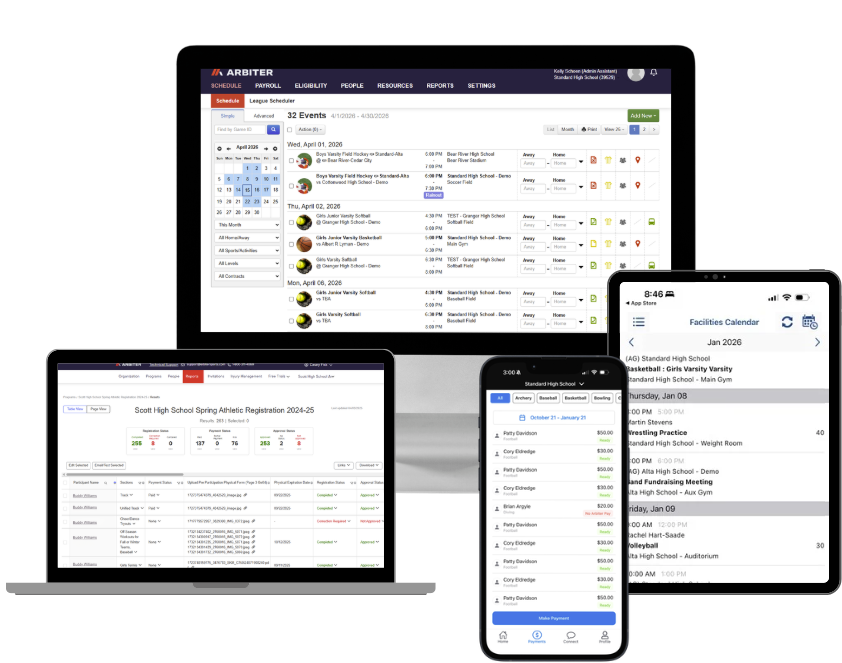
Step 1: Athlete Information Is Collected Through Registration
Students and families submit forms, waivers, emergency contacts, insurance information, and participation payments through a centralized registration process.
Records stay within the same system instead of being distributed across paper files, emails, or separate databases.
Step 2: Eligibility Requirements Are Managed Centrally
Eligibility requirements — including completed forms, participation approvals, physical expiration dates, and academic status — can be tracked within the platform.
Staff no longer need to manually verify participation status across disconnected records.
Step 3: Schedules and Facilities Are Coordinated
Athletic directors build schedules while coordinating facilities, transportation needs, and event logistics across programs.
Connected systems help reduce scheduling conflicts and improve visibility across stakeholders.
Step 4: Officials Are Assigned and Managed
Officials receive assignment notifications, confirm availability, and maintain payment information within the system.
Instead of relying on phone calls, spreadsheets, and manual tracking, schools manage assignments through a centralized workflow.
Step 5: Payments and Participation Stay Connected
Participation fees, athlete records, official payments, and operational reporting remain tied together throughout the season.
That reduces reconciliation work between athletic and finance operations.
Step 6: Schedule Changes Sync Across Operational Workflows
When schedules change, updates can flow across calendars, websites, communication systems, facilities schedules, and related operational workflows.
Instead of manually updating multiple systems, staff manage changes from a centralized platform.
Step 7: Records Are Maintained for Reporting and Accountability
Participation history, scheduling updates, approvals, payments, and operational records remain connected throughout the year.
Reporting becomes part of the operational workflow instead of something rebuilt manually later.
What Types of Software Do Athletic Departments Use?
Athletic departments often use multiple software systems across scheduling, registration, communication, finance, and operations.
Athletic management software is different because it connects many of those workflows into one operational system instead of managing them separately.
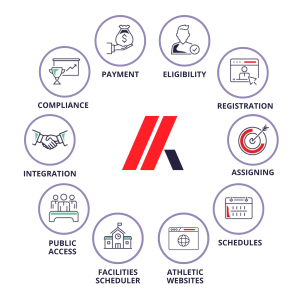
Understanding where athletic management software fits requires looking at how it differs from the other systems schools commonly use.
Athletic Management Software vs. Scheduling Software
Scheduling software focuses primarily on creating and displaying schedules.
Athletic management software uses scheduling as one component of a broader operational workflow that may also include official assignment, facilities coordination, communication, eligibility, payments, and reporting.
The distinction matters because schedule changes affect multiple departments and stakeholders — not just the calendar itself.
Athletic Management Software vs. Registration Software
Registration software is designed to collect forms, signatures, documents, and payments.
Athletic management software extends beyond registration by connecting athlete information to scheduling, eligibility, communication, officials, facilities, and operational reporting.
Registration is one workflow inside the larger athletics operation.
Athletic Management Software vs. Facility Scheduling Software
Facility scheduling software focuses specifically on managing shared spaces like gyms, fields, weight rooms, auditoriums, and community rentals.
Athletic management software includes athletics operations more broadly, including scheduling, eligibility, registration, officials, payments, and communication.
Many schools use facility scheduling software alongside athletic management systems — especially when managing district-wide facilities and community use.
Athletic Management Software vs. Student Information Systems (SIS)
Student Information Systems manage enrollment, attendance, grades, and academic records.
Athletic management software manages athletic operations.
Many schools integrate athletic management platforms with systems like PowerSchool, Infinite Campus, or Skyward so eligibility and participation workflows stay aligned with current student data.
Athletic Management Software vs. ERP or Finance Systems
ERP and district finance systems manage broader financial operations across the school district.
Athletic management software manages sports-specific operational workflows like participation payments, official payments, game-related reporting, and athletics coordination.
These systems often complement each other rather than replace one another.
Athletic Management Software vs. Youth Sports Software
Youth sports platforms are typically designed for recreational leagues, clubs, and team-based communication.
K–12 athletic departments operate differently than recreational leagues and club sports. Schools manage eligibility requirements, official assignment and payment, shared facilities, district oversight, and state association compliance — creating operational needs that extend beyond team communication and registration alone.
Those operational workflows create needs that extend beyond team communication and registration alone.
As athletic departments grow more complex, many schools move from standalone youth sports tools toward centralized athletic management platforms built specifically for K–12 operations.
Key Differences at a Glance
| Software Type | Primary Purpose | What It Typically Doesn’t Do |
| Athletic Management Software | Connects scheduling, registration, eligibility, officials, payments, facilities, communication, and reporting | Replace a school SIS or district ERP |
| Scheduling Software | Creates and displays schedules | Coordinate broader athletics operations |
| Registration Software | Collects forms, signatures, and participation payments | Manage scheduling, officials, facilities, and operational workflows |
| Facility Scheduling Software | Manages shared spaces and reservations | Handle broader athletic department operations |
| Student Information Systems | Manage enrollment, grades, and academic records | Manage sports-specific operations |
| ERP/Finance Systems | Manage district financial operations | Coordinate athletics workflows and scheduling |
| Youth Sports Software | Supports team communication, registration, scheduling, and coordination for recreational leagues and club sports | Manage K–12 eligibility workflows, district oversight, official assignment/payment, compliance requirements, or multi-school athletic operations |
Why Do Schools Outgrow Point Solutions?
Many schools already use software for individual operational tasks:
- A scheduling app
- A payment platform
- A registration tool
- A communication system
Those are point solutions.
The challenge is that athletic departments don’t operate in isolated workflows.
A schedule change affects:
- Facilities
- Transportation
- Officials
- Websites
- Coaches
- Parent communication
- Financial reporting
The operational problem isn’t usually that schools lack software.
It’s that the software managing each process often operates independently.
That’s why many schools eventually move toward connected athletic management platforms instead of maintaining multiple disconnected tools.
What Should Schools Look for in Athletic Management Software?
Most schools evaluating athletic management software are not simply replacing software.
They’re trying to reduce operational fragmentation.
The strongest systems simplify coordination across athletics instead of creating additional disconnected processes to manage.
Centralized Operational Workflows
Scheduling, registration, eligibility, facilities, official assignment, payments, and communication should operate within connected workflows instead of separate systems.
Real-Time Operational Visibility
When schedules, participation status, or approvals change, staff should be able to work from current information without manually checking multiple platforms.
Official Assignment and Payment Tools
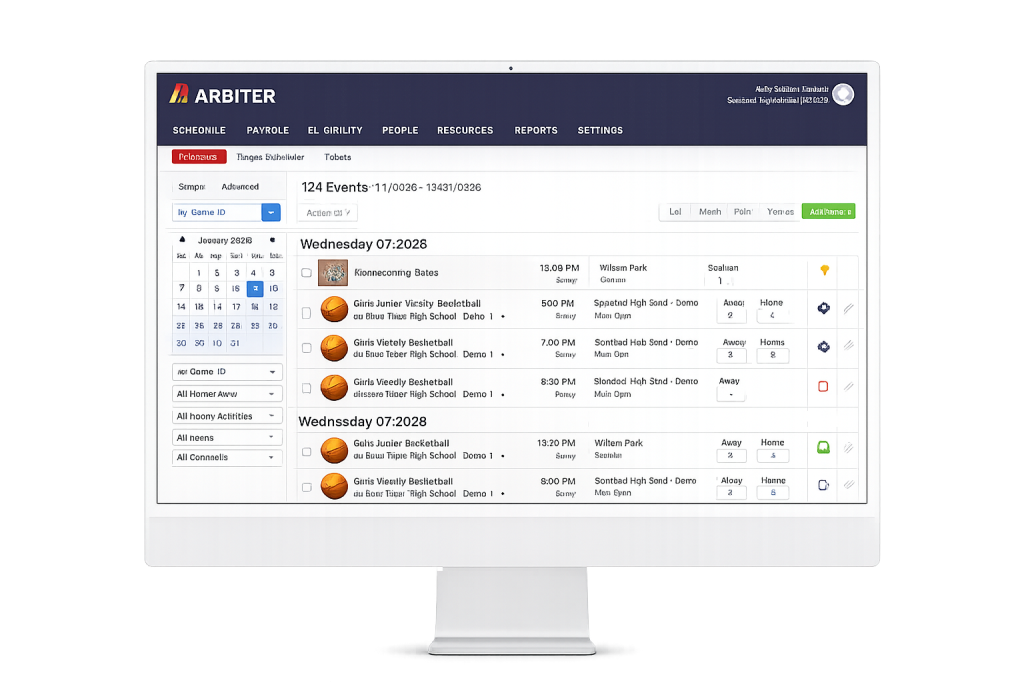
Schools managing large numbers of contests should evaluate how platforms handle official workflows, including assignment coordination, confirmation tracking, and payment processing.
Reporting Without Manual Reconstruction
Schools should be able to access participation, scheduling, payment, and operational data without rebuilding reports from spreadsheets and exports.
District-Level Scalability
Districts managing multiple campuses need operational consistency across schools without maintaining separate processes in every building.
SIS Integration
Strong platforms integrate with Student Information Systems so eligibility and participation workflows stay aligned with student records and academic status.
Quickly identify where disconnected systems are creating extra work, communication gaps, and operational risk.
How Do Schools Evaluate Athletic Management Software?
Schools evaluating athletic management software are usually trying to solve operational problems that have become difficult to manage manually.
The evaluation process should focus less on feature quantity and more on how well the system supports the way the athletic department actually operates.
Evaluate Current Operational Gaps First
Most schools don’t replace software because one feature is missing.
They replace systems because recurring operational issues start creating too much administrative overhead.
That may include:
- Scheduling conflicts
- Disconnected communication
- Manual reporting
- Eligibility tracking issues
- Official assignment complexity
- Payment reconciliation problems
Understanding where the current process breaks down helps schools evaluate platforms more effectively.
Determine Whether You Need a Point Solution or Platform
Some schools only need to solve one operational problem.
Others are struggling because multiple disconnected systems require constant coordination.
Schools should evaluate whether they need:
- A standalone tool for one workflow
- Or a connected platform that centralizes multiple operational processes
The answer often depends on the complexity of the athletic department and how many stakeholders are involved.
Evaluate Existing System Integrations
Athletic departments rarely operate in isolation from the rest of the school district.
Schools should evaluate how platforms integrate with:
- Student Information Systems
- Payment systems
- Facilities scheduling tools
- District reporting workflows
- Communication systems
Integration compatibility can significantly impact long-term operational efficiency.
Plan Around Timing and Rollout
Many schools implement athletic management software during summer, between seasons, or during natural operational transitions.
Planning around existing schedules and staffing cycles can make implementation smoother and reduce disruption.

When Do Schools Typically Adopt Athletic Management Software?
Schools usually adopt athletic management software when operational complexity outgrows their current process.
Common triggers include:
- Recurring scheduling conflicts
- Disconnected operational workflows
- Increasing participation numbers
- Compliance concerns
- District expansion
- Excessive manual reporting
- Communication breakdowns
- Difficulty managing officials and payments at scale
The pattern is usually the same: a process that once worked becomes increasingly difficult to maintain consistently.
Is Athletic Management Software Worth It for Smaller Schools?
Many smaller schools assume athletic management software is only necessary for large districts.
In practice, smaller staffs often feel operational inefficiencies faster because fewer people absorb the administrative workload.
If one athletic director is handling:
- Registration
- Scheduling
- Official assignment
- Payments
- Eligibility
- Communication
- Reporting
even small process gaps can create significant operational strain over time.
The issue usually isn’t the size of the school.
It’s the amount of coordination required to keep athletics running consistently.
Frequently Asked Questions About Athletic Management Software
What is the difference between athletic management software and a sports scheduling app?
A sports scheduling app creates and displays schedules. Athletic management software uses scheduling as one component of a broader operational platform that also manages registration, eligibility, official assignment, facilities, payments, communication, and reporting.
The distinction matters because schedule changes affect multiple operational workflows. In a connected platform, those updates can flow across calendars, websites, facilities, communication, and related systems automatically.
Do K–12 schools need separate software for athletic management?
Most schools benefit from purpose-built athletic management software because athletic operations involve workflows that general school systems were not designed to manage.
That includes:
- Official assignment and payment
- Athletic eligibility
- Sports scheduling
- Facility coordination
- Participation tracking
- District-level athletic reporting
Most Student Information Systems support academic records well, but athletic departments still require operational workflows built specifically for school sports programs.
Can athletic management software handle official payments?
Yes. Full athletic management platforms often include official assignment and payment workflows directly within the system.
Schools can assign officials, track confirmations, manage payment records, and process payouts digitally instead of relying on spreadsheets, phone calls, and manual reconciliation.
For districts managing large numbers of contests, that can significantly reduce administrative workload.
How does athletic management software integrate with a Student Information System?
Many platforms integrate with Student Information Systems such as PowerSchool, Infinite Campus, and Skyward.
These integrations typically help synchronize enrollment and academic data so eligibility workflows remain aligned with current student records.
The specific integration structure varies by platform, which is why SIS compatibility is an important evaluation question during the buying process.
Is athletic management software useful for small schools?
Yes. Smaller schools often benefit significantly because fewer staff members are responsible for a larger percentage of operational coordination.
When one athletic director is managing scheduling, communication, eligibility, officials, and reporting manually, centralized workflows can reduce administrative overhead substantially.
How does athletic management software help with compliance?
Athletic departments manage multiple forms of compliance, including eligibility requirements, participation documentation, official payment records, financial reporting, and district or state association requirements.
Athletic management software helps centralize those records, maintain operational visibility, and create cleaner documentation across athletic workflows.
Quickly identify where disconnected systems are creating extra work, communication gaps, and operational risk.
The Bottom Line
Athletic management software is the operational infrastructure behind modern K–12 athletic departments.
It replaces disconnected combinations of spreadsheets, paper forms, emails, scheduling tools, and manual coordination with a centralized system built specifically for how school athletics operate.
The schools that benefit most are usually the ones where athletic directors spend more time coordinating operations than supporting athletes, coaches, and programs.
The biggest outcome schools describe is rarely a single feature.
It’s operational consistency.
Instead of constantly reconciling schedules, payments, eligibility records, facilities, and communication across separate systems, departments operate from shared information across the entire athletic program.
That shift gives athletic departments more visibility, less administrative overhead, and more time focused on students and sports instead of coordination work.
If you’re evaluating athletic management software for your school or district, the most important question usually isn’t whether you already have software.
It’s whether the systems you already use actually work together.
See How Arbiter Connects Your Athletic Operations
Walk through how schools manage scheduling, registration, eligibility, officials, payments, facilities, and communication within one connected platform.
About the Author
Brittany taught high school English for six years. She’s passionate about helping schools simplify operations so both staff and students can thrive.